
What is behind the abbreviation BYOD? The revolution in the workplace or just the next security loophole? Read on to find out what it’s all about and the advantages and disadvantages of this model.
What does BYOD – Bring Your Own Device – mean?
“Bring Your Own Device”, or BYOD for short, describes the possibility for employees to use private mobile devices such as laptops, tablets and smartphones for work purposes. In addition to the abbreviation BYOD, terms such as BYOT (“Bring Your Own Technology”) or BYOA (“Bring Your Own Application”) are also commonly used to describe a similar model. However, it is always about the use of private resources for business purposes. The diversity of terms on this topic also reflects the diversity of opinions, possibilities, opportunities and risks of this way of working. Companies can use their organizational guidelines to determine how private end devices can and may be used to access company data or internal networks. The advantage of BYOD is that it gives employees a great deal of freedom of choice, which takes personal needs into account. On the other hand, the own device at work model is associated with security risks, as internal company data is used on external devices.
Basic requirements for BYOD
In order to create the right framework conditions, BYOD can be viewed from two perspectives , that of the company and that of the user. The basic requirements for a good BYOD model can be described in seven steps:
- Data protection
- Application software
- Operating system
- Hardware
- Physical security
- Processes and safety awareness
- Areas of responsibility, organization and policies
1. data protection
Companies should always determine how and whether company-related data can and should be stored on a device, especially if it is a private device. It is important that the company is responsible for ensuring the protection of company data, even if the data is stored or processed on private devices. Encryption is an important aspect here. It must be ensured that the data is encrypted on the mobile device and during transmission. In addition, it has been clear since the GDPR came into force that private and business data must be strictly separated.
2. application software
The company must specify which applications and apps may be used to access company data. For example, it should be ensured that employees only have access to the infrastructure via a secure browser. The so-called container principle goes one step further. This uses a container app that provides a secure area on the mobile device for company data. This means that there is no interaction with data or applications outside this protected area. One such application is SecurePIM. It must also be ensured that employees only use applications for their work that the company has licensed. Otherwise, this would be a violation of copyright law.
3rd operating system
To ensure further security within the BYOD model, the operating systems of the devices should always be up to date. The updating of private devices that move within the company network is usually the responsibility of the users. For this reason, it makes sense to sensitize them to always keep their applications and operating systems up to date. With the help of solutions such as SecurePIM or a mobile device management system, these updates can be enforced and are therefore on the safe side.
4. hardware
Companies should think about whether they only allow certain devices to be used in the BYOD concept or leave the employee full freedom. Consideration should also be given to which security mechanisms are specified for the hardware (e.g. password policies or encryption mechanisms). It is particularly important to ensure that usability does not suffer too much from the security measures.
5. physical security
In addition to security in the use and transfer of data, the security mechanisms for physical access to the system must not be neglected. This includes, for example, the prohibition of transferring company data to external storage media. While the interface can simply be blocked on company-owned devices, within the BYOD framework, user awareness or an MDM policy must be used or only certain applications (such as a container app) must be approved for access to company data.
6. processes and safety awareness
As already mentioned several times, security awareness is an important component of a successful BYOD concept. Without the willing and reliable cooperation of employees, the success of a BYOD model is inconceivable. However, good security processes are also an important measure. These should include an option for remote data deletion and logging on and off within the BYOD system.
7. areas of responsibility, organization and policies
Of course, the areas of responsibility must also be clearly defined. The definition of a BYOD company policy is also essential. Possible framework conditions for such a BYOD agreement follow in the next paragraph.
BYOD agreement
Since employees can use their private devices during working hours, an agreement should be made in advance. This should include the following points:
- Reimbursement or sharing of costs for devices and, if applicable, mobile phone contracts
- Use of the device
- Security guidelines
- Support and assistance
- Consequences of non-compliance with the agreement
Reimbursement or sharing of costs for devices and, if applicable, mobile phone contracts
It should be clearly stated in the company guidelines who is responsible for the costs of the devices and their use. There are two options here: the employer does not reimburse any costs or covers part of the costs incurred. If the employer were to cover all costs and private use were still permitted, this would be known as the COPE model (corporate owned personally enabled). The handling of the costs incurred should be clearly regulated to avoid confusion and possible resentment towards the BYOD concept. Companies must also consider the tax implications and be prepared for regional differences for employees in different countries.
Use of the device
Clear guidelines should also be defined for the general use of the device. It must be clearly regulated which applications and apps may be used and which are not permitted. In case of doubt, it may even be necessary to block certain applications. The same applies to the use of video and photo functions. This regulation not only requires information to be provided to employees, but the IT department must also be consulted to determine which tasks need to be carried out.
Security guidelines
In addition to the usage guidelines, it is also essential to sensitize employees to the security guidelines. Whether data loss, security breaches, stolen and lost devices, employees must adhere to guidelines on password protection, permission of downloads, etc., so a reactive security policy in the BYOD model can be avoided. But with the right approach to security risks, such costs can be avoided. Container solutions such as SecurePIM take responsibility away from the employee here, as it is possible to set exactly what the employee is allowed to do and what not, thus preventing misconduct.
Support and assistance
If problems arise when using the devices, it should be clearly defined who the contact person is and what kind of support is provided.
Consequences of non-compliance with the agreement
Also make it clear from the outset what the consequences will be if theguidelines are disregarded negligently. This will ensure that employees use private devices responsibly.
By observing the agreement, you can prevent many of the problems and risks mentioned above. However, there is a simple, efficient and cost-effective way to ensure a secure BYOD concept: SecurePIM. The container app not only enables secure mobile working, but also makes it easier to manage and secure access to the network!

What are the advantages of BYOD?
Cost savings
If the employee purchases the end device themselves, the acquisition costs for the company are of course eliminated. As mentioned, the guidelines should regulate the extent to which the company contributes to the costs. The situation is of course similar for the use of the device. There must be a clear regulation for the costs of the mobile phone contract or similar usage fees.
Employee satisfaction
The Bring Your Own Device proponents argue that employee satisfaction increases because they can use their own devices. In addition, there is no need for tedious training on the devices. This is a relief for both the company and the employee. In addition, the variety of devices means that the company can meet all requirements, whether techie, power user or digital novice.
More flexibility and mobility
With their own device, employees are even more mobile and flexible. This makes it easier for them to work independently of their location, whether from home or on the move. This is particularly beneficial for parents, sales employees or “digital nomads”. Of course, the implementation of mobility also requires the option of working from home. Employees also appreciate the fact that they don’t have to carry two devices (one for work and one for personal use).
What are the weaknesses of a BYOD model?
Security concerns
Data security has been an issue since the beginning of the article and remains so throughout the BYOD model. Both company-owned data and the private data of employees are affected. A modus operandi must therefore be created through tools and regulations that guarantee that the data neither interferes nor is compromised and that the employee’s privacy is also protected.
Risk of additional work for the IT department and possible loss of control
Of course, the integration of a BYOD concept can also lead to additional work for the IT department. The management of non-company devices requires additional effort and expertise. A heterogeneous software and hardware landscape within a company can hinder the smooth running of processes. You therefore need to think carefully about whether you want to manage the devices themselves (e.g. using an MDM system) or just secure access to the data with a container solution.
Legal requirements must be complied with
There are a number of legal aspects to consider, which puts many companies off. However, if you introduce a clear policy and the right technical solution, these legal issues should not be an obstacle. Read more about how you can implement BYOD in compliance with the GDPR in the white paper “BYOD – Legal aspects“.

Maximum security with the SecurePIM app
With the use of SecurePIM , nothing stands in the way of mobile data security! Thanks to the container app, you have full control over all potential security gaps. Thanks to the innovative design of the solution, integration into existing infrastructures is no problem. The rollout is also easy for administrators. This makes BYOD with SecurePIM a relief for your IT department and all administrators.
Security and compliance officers also benefit from the use and development of SecurePIM. Thanks to numerous security mechanismssuch as encryption according to the latest standards, SecurePIM offers them ideal protection for mobile working, regardless of the end device (iOS or Android). All data is secured within the container in compliance with the GDPR. Your data is also always secure during transmission thanks to the latest encryption technologies. Thanks to the principle of the protected containers even with a BYOD model, company data is secure and strictly separated from private data, naturally in accordance with the requirements of the DSGVO.
Employees also benefit from using SecurePIM. They have access to business data anytime and anywhere. This means that mobile working is secure and high productivity is guaranteed from a technical perspective. The solution can be used by employees regardless of their end device. Thanks to encryption, no one else has access to the data. The container can be unlocked with a password or fingerprint. This means that all important documents can be accessed easily and intuitively. These are processed within the secure environment, both online and offline. The app enables protected access to the following functions:
App functions
- Messenger
- Contacts
- Calendar
- Notes
- Tasks
- Documents
- Browser
- Camera
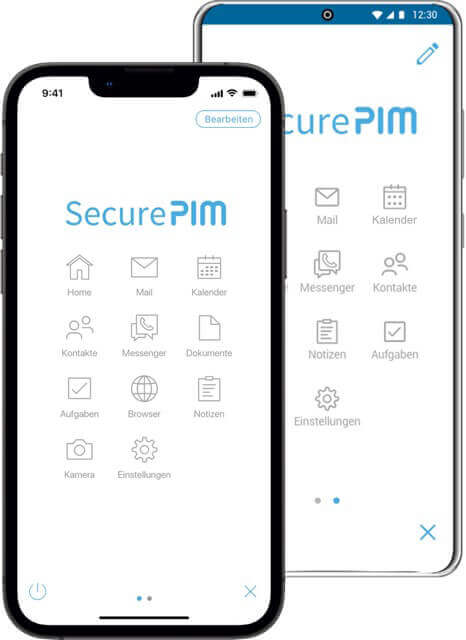
A total of three mail accounts can be linked within the application. With SecurePIM, nothing stands in the way of a successful BYOD scenario. Request your trial version now. Free of charge and without obligation!