


Whether within the company/authority or externally with business partners, service providers and the like – email is the most frequently used communication medium in a business context. Sensitive information is often exchanged. To secure this data, it is important to encrypt and sign emails. In this blog article, we show you how to use encrypted emails in companies and public authorities and how this can also be done easily on mobile devices such as smartphones and tablets.
Why should you encrypt and sign emails?
It is precisely because email is so important for business and official communication that it is a popular gateway for cyberattacks. If a company or public authority does not use email encryption, there is a particular risk that emails can be read by unauthorized persons. And since confidential information, such as company secrets or customer data, is often sent via email, it can quickly fall into the wrong hands.
In addition to encryption, it is also important to sign emails. Unsigned emails can easily be modified by third parties. For example, it is possible to add links or attachments to an email, which can then be used to smuggle malware into the company network. Another risk associated with unsigned emails is the sending of messages under a false sender name. If an attacker pretends to be a colleague or customer, for example, sensitive information can also be leaked in this way – keyword Phishing.
In addition to these IT security risks, the General Data Protection Regulation (DSGVO) encryption. Not explicitly for emails, but for personal data in general. These must be encrypted both during storage and transmission in order to ensure adequate protection.
How do I encrypt emails?
To protect yourself from the risks mentioned, you must encrypt and sign emails. It is important that companies and authorities End-to-end encryption set. This is the only way to ensure that emails are only read by their actual senders and recipients. There are encryption standards for this, such as S/MIME, which take a lot of work off your hands.
Encrypting and signing emails with S/MIME
A very widely used email encryption technology is the S/MIME (Secure/Multipurpose Internet Mail Extensions) standard. S/MIME protects emails from unauthorized access, but also enables emails to be signed by using digital certificates.
S/MIME is based on the so-called asymmetric encryption method. The content of an email can be secured with the help of a public and a private key, which are linked to each other. In concrete terms, this works as follows: As the sender, you encrypt an e-mail with the recipient’s public key, which is publicly available to you. The recipient can then decrypt your e-mail using their private key. As long as the private key is in the sole possession of the recipient, only the recipient can access the contents of the e-mail. By using S/MIME or an S/MIME certificate, your email client, for example Outlook, automatically creates the public and private keys for every user in your company.
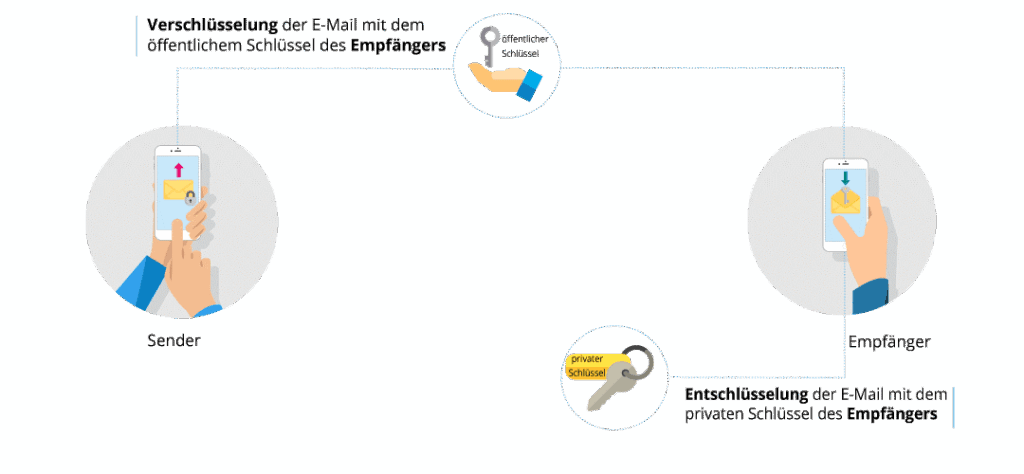
The sender uses the S/MIME signature to prove their identity. A unique digital signature is generated for every email created using the sender’s private key. The public key is used to verify the digital signature with the recipient. This minimizes the risk of phishing in particular.
Further information on how S/MIME works in detail can be found in the Glossary IT security.
Alternatives to S/MIME
In addition to the S/MIME standard, which is used in most companies and authorities, the so-called OpenPGP (Pretty Good Privacy) encryption should be mentioned as an alternative. OpenPGP is also based on an asymmetric encryption method, but is not compatible with S/MIME. It is therefore necessary to choose one of the two formats. The biggest difference between S/MIME and OpenPGP is the different key formats. In addition, S/MIME is compatible with many standard email programs, while OpenPGP is not quite as flexible and is difficult to implement, especially on mobile devices.
How do I encrypt emails on my smartphone & tablet?
In order for the encryption, decryption and signing of emails to also work on mobile devices, users have to make additional settings in the app or on the device, or download additional apps. This is not really user-friendly and, in the worst case scenario, leads to employees bypassing email encryption and signing on their smartphone and tablet and communicating in an unsecured manner.
There is a very simple solution that allows you to send, receive and sign encrypted emails via mobile devices. The app SecurePIM for iOS and Android provides secure access to your email client. Emails are encrypted both during transmission and on the device. In addition to S/MIME encryption and signature, a gateway is also used to ensure maximum security. This ensures end-to-end encryption. This means that unauthorized persons cannot read emails, change them or impersonate a false sender.
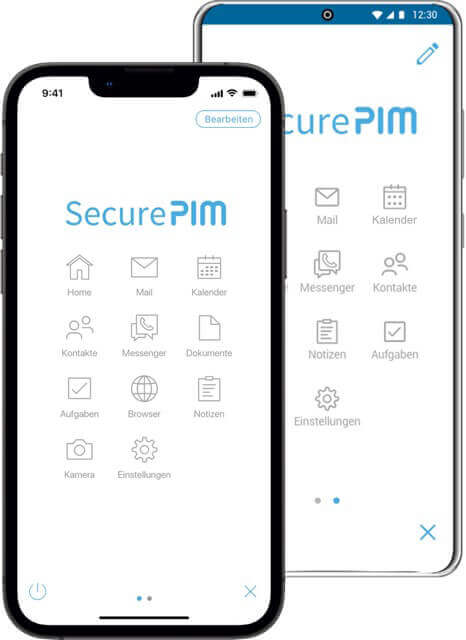
Encrypted emails with SecurePIM:
Flexible
The only Personal Information Management (PIM) solution that supports S/MIME for Exchange and the HCL Domino encryption standard is supported.
Encryption of all company data
Encrypted storage of all data within the container app, including unencrypted emails. Hybrid encryption with RSA up to 4096 bits and AES-256 for use.
Encrypted channel
Data transmission is also encrypted via the SecurePIM Gateway.
Device-independent
Both for private devices in the Bring-Your-Own-Device (BYOD) model as well as for company devices that may be used privately(Corporate-Owned-Personal-Enabled – COPE) – the focus is on your internal data, not on the device itself.
Simple key management thanks to AutoPKI
Possibility of integration into your own PKI infrastructure or provision of the most important functionalities of a PKI via an auto-PKI function.
High usability
Your employees simply download the app from the standard app stores and can immediately start working on the move – email and data encryption takes place in the background without the user having to make any settings.
Find out more about secure mobile working with SecurePIM.