


The IT world has been talking about Android security problems for years. Find out here what impact this has on secure mobile working & MDM.
Android turned 10 years old on September 23, 2018 and is by far the most widely used operating system for smartphones with a global market share of 87.5%. In addition to its hardware independence, reasons such as customizable user interfaces, a wide variety of apps and the fact that Android is an open system play a role in its widespread use.
However, Android is still far from perfect, especially in terms of security. With around 2 billion users worldwide, Android is also very interesting for hackers in terms of sheer numbers. There have often been accusations that Android has security problems. In July 2015, researchers discovered a security vulnerability that made it possible to spy on 95% of all Android devices available at the time. Fortunately, however, the so-called Stagefright did not cause this super disaster. To avoid further mishaps, Google has launched numerous measures to increase Android security.
The biggest Android security risks for corporate IT
The question now arises, especially for corporate IT, as to how Android devices can still be used securely in everyday working life. This is because employees are increasingly using personal devices to check work emails and company cell phones for personal matters. According to a recent survey by Michael Page, as many as 35% of employees surveyed use their private smartphone for work-related purposes and, conversely, as many as 48% use company cell phones and tablets for private purposes. This mixed use is a particular headache for internal IT, but there are also some aspects to consider with regard to correct compliance with the GDPR. Here you can find out which risks need to be considered when using Android-based devices in the company and how to avoid them:
Update problem
Android is not necessarily the same as Android – because each smartphone manufacturer is responsible for which version runs on which device. Manufacturers also brand Android very differently and adapt the standard version to their own company. As a result, updates are sometimes only available months after the official release by Google, depending on how quickly the manufacturers make them available and adapt them accordingly.
In extreme cases, older or very inexpensive devices may not receive any updates at all after a certain point in time or they may arrive with outdated operating systems. This is because manufacturers are not obliged to provide new updates. Even known security gaps can therefore no longer be closed and remain until a new device is purchased.
The particular problem with missing updates is that it is not possible to react to security gaps. If the manufacturer no longer supports updates for a model, any security gaps discovered will be closed by Google in new Android versions but not distributed to the devices.
G oogle smartphones are of course the exception here; updates are available immediately or within two weeks at the latest. With devices from the Enterprise Edition, Samsung is also increasingly focusing on the business customer sector. Enterprise devices receive an update guarantee of up to 4 years from the start of sales. This includes up to two new Android versions as well as monthly or three-monthly security updates.
Transmission of sensitive data through apps
Applications such as WhatsApp often require access to private data such as location, phone number, email address or contacts. Until the Marshmallow update (Android version 6.0), this could only be denied by default if the software was not installed. Since Marshmallow, access to location or contacts can be blocked. Although it is possible to authorize access only for selected contacts via external apps or by creating contact groups, this is not very user-friendly.
The majority of users – regardless of whether they use Android or iOS – grant apps such as WhatsApp permissions once when they install them and then no longer think about which app is accessing which data. This is a major risk, especially with regard to the GDPR. Read more about how you can still use WhatsApp and co. in compliance with the GDPR in the article on mobile risks.
Malware through 3rd party apps
Since the beginning of 2012, all apps in the Google Play Store have been automatically checked before they are made available for download. Nevertheless, the Play Store is considered less secure than the Apple App Store and security precautions are often circumvented. Apps then end up in the Play Store despite being checked and can spy on users or intercept sensitive data. Google is aware of the problem and is doing a lot to make the Play Store more secure, but there are still security risks.
Furthermore, the Google Play Store is not the only app store for Android devices. Untested apps can therefore be installed manually by the user. Although this installation requires the user’s direct consent, so-called malware still ends up on the smartphone in this way.
Container app: Secure mobile working with Android devices
What is the best way to circumvent these risks and at the same time ensure that private and professional data on Android devices are kept reliably separate? And in both the BYOD (Bring Your Own Device) and COPE (Corporate-Owned, Personally Enabled) models?
One obvious option for companies is to either prohibit the use of Android devices for business purposes in general or to only allow them from a certain Android version onwards. Mobile Device Management (MDM) solutions are another way of securely managing mobile Android devices, and MDM is frequently used in larger companies in particular. For example, a company can use MDM to generally block the download of certain apps or manage their settings centrally, although this is very time-consuming and does not solve all data separation problems.
In addition, container solutions such as SecurePIM from Materna Virtual Solution are a very quick way to securely separate private and professional data on Android devices and circumvent all the security problems mentioned above.
With the help of sophisticated containerization, SecurePIM offers maximum data security for Android devices as well as iOS devices. All company data is stored in a container on the mobile device and is encrypted twice, on the device itself and during transmission. Company data stored in the container is protected against access by third-party apps or malware.
At the same time, IT cannot access employees’ private data that is stored in other areas of the Android device. In the event of loss, the container can simply be deleted remotely – for both BYOD and COPE. All security settings for the mobile devices used for business purposes can be made in the associated SecurePIM Management Portal.
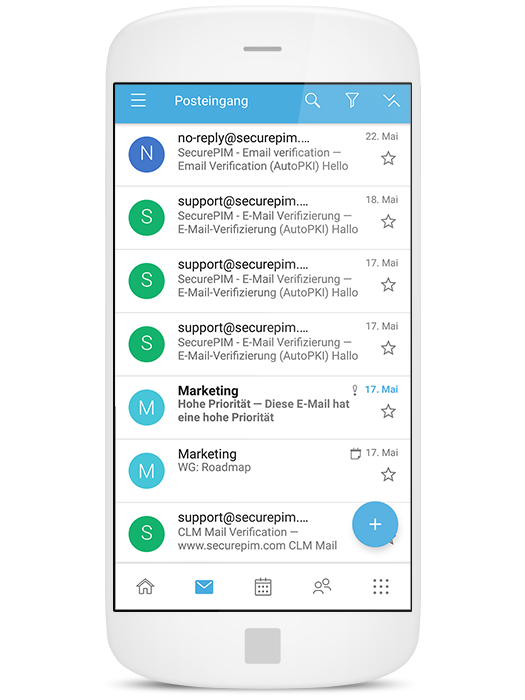 Of course, the user-friendliness also leaves nothing to be desired. The container app is adapted to the Android look and feel and can therefore be used without a great deal of training. The complex encryption processes take place automatically in the background. Communication is intuitive and requires little effort on the part of the user.
Request your trial version now. Free of charge and without obligation! To the test version